Microsoft hasn’t had the best reputation when it comes to web browsers. For the past half-decade, Internet Explorer and Microsoft Edge have played second fiddle to Google Chrome and Mozilla’s Firefox, often serving no other purpose than to install these rival browsers. In a bid to win back some share of the browser market, Microsoft is remaking Edge based on Chromium.
Chromium is an open-source browser project, or web rendering engine if you prefer, started by Google that developers can build upon to create more fully-fledged browsers. Google Chrome, Opera, and Amazon Silk are just a few examples of browsers built on Chromium. With Microsoft also moving over to the popular open-source project, Firefox now stands out as the last major option not built around Google’s vision for the web.
Microsoft Edge Chromium is still in beta, but I’ve been trial running it as my primary PC browser for a couple of weeks now. Unfortunately, there’s no Android version of Edge built on Chromium just yet. As a long-time Google Chrome user and frequent dabbler in Firefox, I’ve been pleasantly surprised by my time with Chromium-ified Microsoft Edge. In fact, it’s quite likely that Edge will become my default browser upon final release.
Microsoft Edge Chromium is full of nifty features
You wouldn’t immediately place Microsoft, Edge and useful features in the same sentence, but the company’s latest browser is full of neat tricks.
For starters, you’ll find the usual assortment of favorites, importing bookmarks, and link sharing options. Edge also offers a built-in Dark Mode, although it doesn’t overwrite webpage color schemes. What more exciting is Microsoft’s “Read Aloud” feature that’s included out of the box, which can read back webpages to you. Handy for proof-reading this article and digesting the news with a morning coffee. There’s also an Immersive Reader mode if you fancy reading a website without the custom formatting.
15 best Android browsers for surfing whatever website you want!
Web browsers are one of the most important apps on any device. Having the right features and performance while browsing the web can literally change your entire experience. Finding the right one can be difficult …
A major plus for me is built-in Chromecast support. I’ll often cast video streams from my tablet or PC to my living room TV. This is one of the reasons why I haven’t been able to shake off Chrome for Firefox, but Edge finally allows me to make the switch and keep on casting.
Edge also boasts a Collections feature. This allows you to curate collections of web pages, images, and text snippets via a simple drag and drop. Think of it as enhanced bookmarks. It’s handy for saving stuff for later without cluttering up your favorites and you can also open Collections up in Excel and Word.
Microsoft finally feels on the cutting edge of the internet.
The final major feature is called Apps. Essentially, Apps allows you to download and install web pages and web apps for use without the Edge browser. Previously, you had to find these dedicated web apps via the Microsoft Store, but now Edge handles downloading and managing web apps all in the browser.
For example, you can download the Twitter web app via Edge just by visiting the Twitter website and clicking “install this site as an app” from the settings menu. Once installed, you can run the webpage as an app directly from your desktop, taskbar, or start menu like any other piece of software. It’s like saving links only better, as some web apps can run offline too. Alternatively, you can install the Android Authority webpage and run it as an app to catch up with the latest news without having to boot up Edge each time. It’s pretty neat and something that I intend to use more often.
Overall, Edge offers everything you’ll want in a web browser and more. Microsoft finally feels on the cutting edge of the internet.

Not as RAM hungry as Chrome
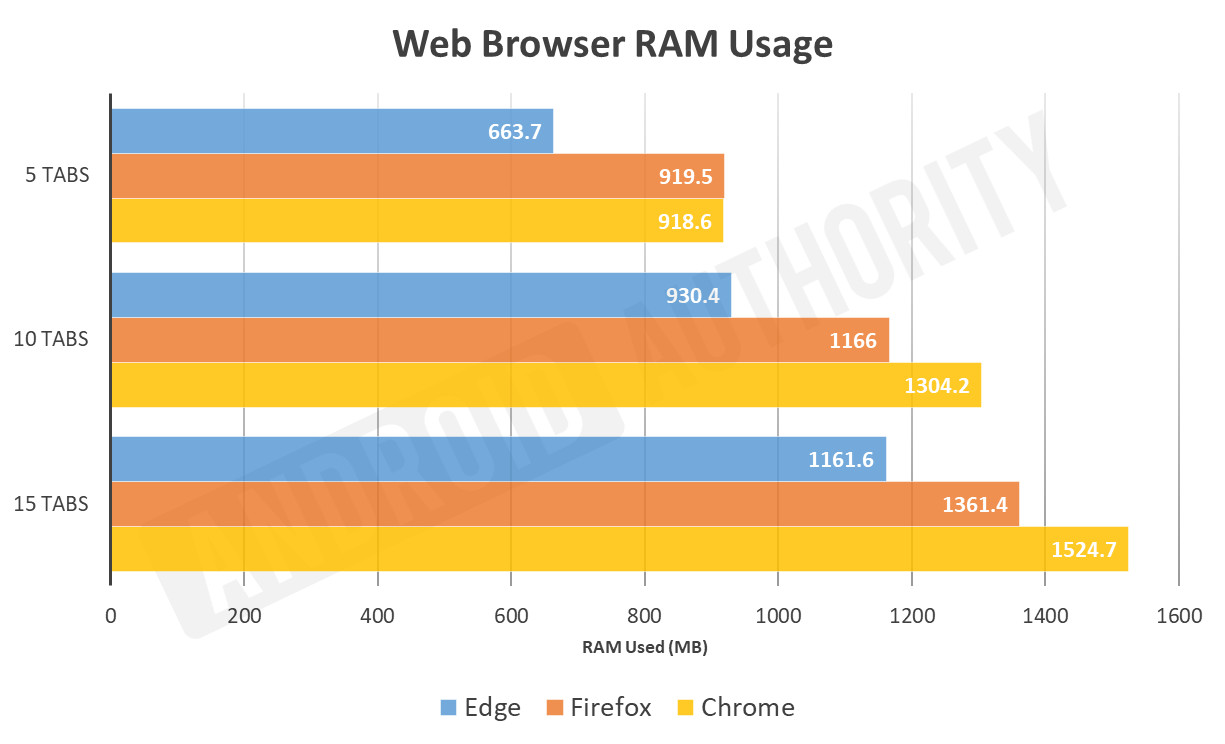
Google Chrome is a notorious performance hog. It’ll take as much RAM as you can give it and that’s one of the main reasons people switch to the much lighter Firefox. The good news is that Microsoft Edge Chromium is even more lightweight than Firefox. It certainly feels like the snappiest browser out of the three.
I ran a quick test, opening up to 15 unique tabs (using the same tabs on each browser) and measuring RAM use once all the pages loaded. The results are quite surprising. Microsoft Edge uses substantially less RAM than Chrome, despite both being built on Chromium, and even less than Firefox too. Edge typically uses just 70 to 75 percent of the RAM required by Chrome, a big deal for systems with limited memory.
Another point worth mentioning is that at no point during my couple of weeks with Edge have I noticed it thrashing my hard drive. Chrome has a habit of scanning various files on my computer, despite opting out of all the available data sharing options. This isn’t great for system performance and raises obvious security questions. The privacy-conscious may want to opt for Edge over Chrome. Although Microsoft already has its share of telementary issues with Windows 10 and Firefox is still the safe bet if you’re after maximum privacy.
Microsoft Edge Chromium download and release date
The full release of Microsoft Edge Chromium edition is expected in January 2020. If you want to try out the beta release, just follow the Microsoft Edge Chromium download button below. The Canary build of Edge Chromium also works with Windows on Arm devices, such as the new Surface Pro X. Chrome still hasn’t released its Arm version, making Edge a compelling choice on these platforms if you’re not already using Firefox.
Microsoft Edge Chromium — The early verdict
Microsoft Edge built on Chromium is a snappy, lightweight web browser that’s a breath of fresh air compared to previous Microsoft releases. Even in its current beta state, Edge is a worthy competitor to the established players. I haven’t experienced any major bugs. Overall, it’s significantly leaner than Chrome while packing in more features than Firefox. It’s definitely worth trying out.
It's quite likely that Edge will become my default browser.
Edge isn’t perfect yet, however. The range of supported Extensions isn’t as large as other browsers when searching the Microsoft Store. Frankly, any tie-in to the Store is an unnecessary extra step, as installing extensions could just be handled in the browser like its rivals. Fortunately, you will find ad-blockers, password managers, and other very popular extensions, and can manually install Chrome extensions too. Hopefully, this situation will improve upon the final release.
More posts about Microsoft
from Android Authority https://ift.tt/2YSUuDp