
Samsung’s Galaxy S phones set the tone for the year’s Android flagships. The S20 lineup is no exception. We’ve already covered the Galaxy S20 Ultra and S20 Plus in-depth, and they are, without a doubt, incredibly powerful phones as far as performance, imaging, and design are concerned. However, like every year, your experience will vary quite a bit depending on your geographic location. While the North-American market gets Qualcomm’s latest and greatest Snapdragon 865 chipset, Europe and Asia have to contend with the Exynos 990 chipset.

Qualcomm Snapdragon 865 vs Kirin 990 vs Exynos 990: How do they compare?
Traditionally, the Exynos variant has lagged behind the Snapdragon version of Samsung’s flagship. Is this year going to be any different? We decided to put the two versions of the Samsung Galaxy S20 Plus against each other to find just that, and here’s how the two phones fared.
Editor’s note: In this post, we’re analyzing the performance differences between the two versions of the Galaxy S20 Plus. Stay tuned for our battery consumption analysis, coming soon.
What’s different between the Snapdragon 865 and Exynos 990 chipsets?
Commonalities between the Snapdragon 865 and Exynos 990 include the use of a 7nm process, as well as the lack of an integrated modem. Being built on a 7nm process, the chipsets are fast, yet power efficient and have better thermal management. Everything else, however, is different.
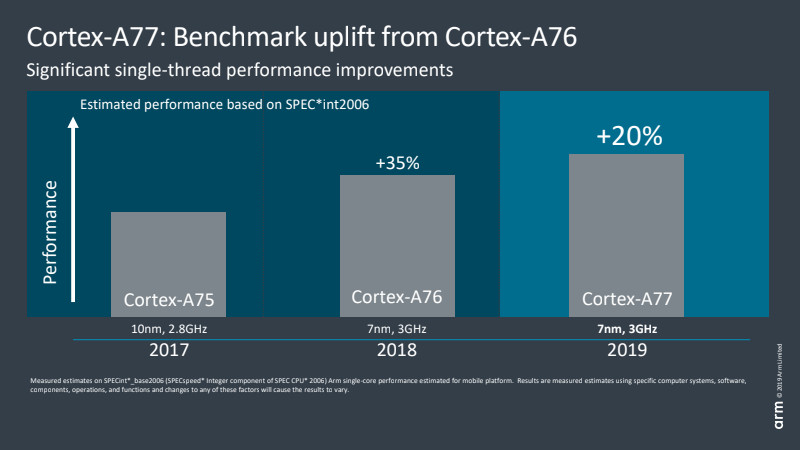
To start with, the two chipsets use a familiar Arm big.LITTLE architecture, but the core layout is drastically different. The Snapdragon 865 makes use of ARM’s latest Cortex A77 core. The Cortex A77 offers up to a 20% performance boost over the Cortex A76, while sticking to a similar thermal footprint. The Snapdragon 865 has one A77 core clocked at 2.84GHz, paired with three A77 cores at 2.50Ghz and four A55 cores at 1.80GHz performing less demanding tasks to conserve battery life.
Similarly, the Exynos 990 opts for four Cortex A55 cores clocked at 2.0GHz for background tasks that don’t require much power. Paired with these are two Cortex A76 cores running at 2.50GHz and two Mongoose M5 cores at 2.73GHz. It is worth noting that the Mongoose M5 is Samsung’s last fully custom design.

Ditching custom CPUs is the right call for Samsung’s Exynos
With every successive generation, there is a significant step up in graphics performance too. Traditionally, Qualcomm’s Adreno GPU has had a leg up over the Exynos competition. In fact, Samsung has teamed up with AMD to boost the GPU capabilities of future Exynos chipsets. The Exynos 990, however, ships with a Mali G77 GPU.
Let’s talk numbers
Chipset enhancements are a moot point if they don’t translate into real-world gains. All tests were run under similar conditions between my colleague Jimmy’s Galaxy S20 Plus, running Snapdragon 865, and my Indian unit with the Exynos 990 chipset. Keep in mind, the Indian unit lacks a 5G modem though this should have no bearing on performance scores.

All tests were run multiple times to account for any performance variations, and were conducted at both Full HD and WQHD resolutions. For tests run at the Full HD resolution, we ran them at both 60 and 120Hz to gauge the impact on GPU performance. Let’s dive in then!
Samsung Galaxy S20 Plus: Full HD at 60Hz
The Galaxy S20 Plus ships with the display set to Full HD resolution and the refresh rate at 60Hz. With the lightest battery drain out of the three possible configurations, it makes sense that Samsung ships the phone optimized to deliver the best possible battery life.
Starting off with the CPU-focused Geekbench benchmark, the Cortex A77 core in the Snapdragon variant pulls ahead ever so slightly with a score of 811.4 points versus the 764 points scored by the Exynos version. This difference becomes even more pronounced when we switch over to multi-threaded tests. The four Cortex A77 cores employed by the Snapdragon 865 are a generation ahead of the Cortex A76 cores on the Exynos 990.
We tested out GPU performance using a combination of GFXBench and 3DMark. Interestingly, the Exynos 990’s Mali G77 GPU performed significantly worse than we’d have expected. With the display set to Full HD, 60Hz mode, we observed that the Exynos chipset’s GPU lagged behind by almost 50%. We believe that the chipset is performing some kind of thermal throttling to optimize for battery life over all-out performance. In 3DMark, the difference wasn’t as drastic, however, the 865 still managed to pull ahead.
Set at Full HD, 60Hz out of the box, the Exynos 990 appears to be throttling aggressively in some scenarios to deliver better battery life.
Finally, we put the two phones through Basemark to get a better understanding of system performance. The benchmark comprehensively tests out multiple facets of system performance. From browsing to the camera, as well as storage, Basemark gives us an overarching view of the phone’s performance levels. Here, once again, the two phones are almost evenly matched, but the 865 again manages a slight lead. I suspect the quad Cortex A77 cores have a lot to do with the superior performance. Elsewhere, the two phones are evenly matched with 8GB of fast RAM and UFS 3.0 storage.
Samsung Galaxy S20 Plus: Full HD at 120Hz
A key selling point of the Galaxy S20 Plus is the new-fangled 120Hz display. The benefits are immediately apparent when navigating the interface. Scrolling is a lot more fluid and icons remain tack sharp even when scrolling fast. Of course, your experience in apps will vary since not every app supports the high refresh rate mode.
While Full HD at 60Hz has been the standard for years, cranking up the refresh rate places a bit more stress on the GPU and we expect to see this reflected in our benchmark testing.
In the CPU-focused Geekbench test, there is a marginal reduction in performance over the 60Hz mode, not enough to be noticeable. Meanwhile, the multi-threaded scores remain consistent. Moreover, we see a similar trajectory as in the 60Hz mode. The Snapdragon 865 with its Cortex A77 cores is faster than the Exynos 990, but not by much.
The Mali G77 GPU delivers much better performance with the refresh rate set to 120Hz. However, the Adreno 650 still pulls ahead.
Switch over to graphics benchmarks, and the scores between the Snapdragon and Exynos versions are a lot closer. This lends further credence to our theory that Samsung is aggressively throttling down the GPU at 60Hz to tune for better battery life. In certain benchmarks, we noticed that the Mali G77 delivered an almost 45% improvement in performance over the equivalent 60Hz. The Adreno 650, however, still pulls ahead and in some cases can deliver up to a 24% performance boost over the Mali G77.
Finally, in the overall system performance, we didn’t notice much of a performance delta between 60Hz and 120Hz modes. The Snapdragon 865 variant offers a performance improvement of about 12-13%, which, while significant, shouldn’t matter too much in everyday use.
Samsung Galaxy S20 Plus: WQHD at 60Hz
Want to experience high-definition video and games at the highest resolution possible? This is the mode for you. Predictably, running the phone at its native WQHD (Quad HD) resolution puts the maximum amount of strain on the GPU and our testing results back this up.
Set to the highest resolution, there is little performance variance in the CPU-bound benchmarks. Geekbench results are roughly in line with what we saw at Full HD resolution. Interestingly, the Exynos 990 just manages to edge forward in the single-threaded benchmark, but only slightly. Multi-threaded performance still trails the Snapdragon 865 by between 8%-9%.
There is a significant hit to GPU-bound performance when running at WQHD resolution.
There are two interesting trends to note in the GPU benchmark. To start with, the performance delta between the Adreno 650 and Mali G77 remained consistent. However, in GFXBench, we saw an over-all hit of almost 50% to performance. Rendering at that high a resolution has a clear and defined performance penalty and if you want the highest possible frame rates, you might want to avoid running the phone at WQHD resolution while gaming.
In day-to-day applications, however, we noticed no dip in performance over the equivalent Full HD modes.
Exynos or Snapdragon, which Galaxy S20 Plus variant is faster?
Between the Snapdragon and Exynos variants of the Galaxy S20 Plus, the numbers confirm what we’ve suspected. For day-to-day use, CPU-heavy applications, the performance difference is minimal and most users will be more than satisfied with either phone.
GPU-bound performance is, however, a very different story. The Adreno 650 GPU delivers significantly better performance across all combinations of resolution and refresh rates. Additionally, you will definitely suffer a significant performance penalty on the Exynos 990 version of the Galaxy S20 Plus if you want to push for better battery life by keeping the phone at the default Full HD resolution at 60Hz.
Now read: Torture test: Samsung Galaxy S20 Ultra battery life at 120Hz vs 60Hz
If the best performance is a key criteria for you, the Snapdragon 865-packing Galaxy S20 Plus is what you want.
More posts about samsung-galaxy-s20


from Android Authority https://ift.tt/2xiMt0E


