Gaming can be an intimidating hobby to get into. The sheer variety of platforms and games can be overwhelming to a newcomer, but a gaming console is never a bad choice. They are straightforward to use and offer many other perks. Finding the right console mainly depends on what you prioritize — whether you want stellar graphics, a great library of exclusives, or portability, there is a console that’s right for you. We are here to help you with your choice by presenting you with our top picks for the best gaming consoles you can currently buy.
The best gaming consoles:
Editor’s note: We will update this list regularly as new consoles launch.
1. PlayStation 4 Pro

Sony has had its ups and downs in the console wars, but it’s done a marvelous job with the PlayStation 4. It’s slim, powerful and chock full of great games.
Consoles live and die on their libraries of exclusives and it’s hard to beat the PlayStation 4 Pro in this department. From the already available God of War, Bloodborne and Horizon Zero Dawn to the upcoming The Last of Us Part II and Final Fantasy VII remake, there is no other game console that boasts as many narratively interesting and visually stunning games. Although the Xbox One X certainly performs better and offers 4k 60fps gaming more often, it’s hard to resist the game quality and quantity of the PlayStation 4 Pro.

The Sony console also beats every other device on the market in the virtual reality department. Its dedicated PlayStation VR headset is cheaper than pretty much all PCVR and standalone headsets, and still offers a 120Hz refresh rate despite being a few years old. The VR game library is unrivaled too, with titles like Astro Bot: Rescue Mission and Moss.
The PlayStation 4 still lags behind the Xbox One X in some areas.
The PlayStation 4 Pro is not perfect, however. One of its biggest pitfalls is lack of backwards compatibility. Any PS3 games you’ve bought — be they physical or digital, won’t work on the latest gen console. This is a huge drawback for anyone that previously owned the PlayStation 3 because it forces you to either repurchase all of your old games or sign up for PlayStation Now. The PS Now service allows you to stream older games online, but it has a lot of limitations and a steep $59.99/year subscription fee. It’s also a far cry from Xbox’s Game Pass, which works both on console and PC.
Nevertheless, the PlayStation 4 Pro is still one of the best, if not the best, game consoles on the market. If you are new to console gaming, you can’t go wrong with it.
2. Xbox One X

If you want power, you need the Xbox One X. This beastly Microsoft console is unrivaled when it comes to specs, at least until the Xbox Series X arrives later this year.
The Xbox One X is a graphics powerhouse. Thanks to its hardware, you can enjoy games in buttery smooth 4K 60fps. It’s true that this is also an option on the PlayStation 4, but the Microsoft console has more games with a native 4K resolution and will struggle less to maintain a high frame rate. The Xbox just runs faster and performs better.

However, the Xbox One X lags behind the competition in one area — exclusive games. It does have some great titles like Halo and Sea of Thieves, but they can’t rival the sheer variety and quality of PlayStation titles. A large percentage of Xbox One X exclusive games are also available on PC. This makes it a much more questionable purchase if you already own a decent gaming laptop or PC. The Microsoft console doesn’t have an answer to PlayStation VR either, which limits your options even further.
Xbox Game Pass is the best console service of its kind.
It does get one thing completely right though — the Xbox One X has backwards compatibility. You don’t have to build up your library of games anew if you previously owned an Xbox 360. As previously mentioned, the Xbox Game Pass service is also hard to beat. It’s the Netflix of console gaming, with a rotating catalog of over 100 games, and it’s available on both PC and Xbox One. You are not forced to stream Game Pass games either. Titles are downloaded to your console, so you can enjoy them even if your internet is not particularly great.
Finally, we can’t ignore the price of the Xbox One X. It’s the most expensive console on the market and that’s not terribly surprising with its hardware. Quality comes at a price. It’s one of the best gaming consoles you can buy.
3. Nintendo Switch

After the lackluster Wii U, Nintendo finally hit the nail in the head with the Nintendo Switch. Instead of directly competing with its powerful rivals, this console carved out its own gaming niche.
The Nintendo Switch is a hybrid that works both as a portable and as a home console, and that’s what makes it stand out from the crowd. You can play games in the comfort of your living room, but you are not tethered to your TV. Thanks to the two detachable controllers, called Joy-cons, you can enjoy games with friends even when you are on-the-go. But the Nintendo Switch offers much more than convenience. It has one of the most versatile game libraries, which includes exclusives, triple A games, indies, and retro games.

It’s true that the Switch doesn’t have the graphical fidelity of the Xbox One or PlayStation 4 — 4K 60fps is out of the question. However, the hybrid console’s custom Nvidia Tegra chip can handle plenty of demanding games, including everyone’s favorite Witcher 3. Additionally, we can’t forget the draw that Nintendo exclusives have. The Legend of Zelda: Breath of the Wild and Animal Crossing alone make the Nintendo Switch a console worth buying. You will also find plenty of great indies such as Stardew Valley, Night in the Woods and many more.
If you enjoy indies and retro games, the Switch is the right console for you.
Where the Switch falls shorts is its online capabilities. Its online subscription service costs less than those of the competition, but it also offers less. However, for $3.99 a month, it gives you access to over 60 old-school Nintendo games, which will appeal to any retro gamer.
The Nintendo Switch has one final advantage over the competition. Nintendo CEO Shuntaro Furukawa has confirmed it won’t be replaced with a newer gen Switch this year. That means you won’t have to worry about backwards compatibility or spending cash on a console that will be quickly outdated.
4. Nintendo Switch Lite

If you are not sure you want to commit to a home or hybrid console, your best choice is the Nintendo Switch Lite. It is the best truly portable game console you can currently buy.
The first question on many people’s minds about the Nintendo Switch Lite is what the differences between it and the regular Switch are. Both consoles sport the same Nvidia Tegra custom chip, but most similarities end there. The Switch Lite is true to its name. It is smaller and lighter than the original, weighing in at 9.8 ounces to the Switch’s 14.1 ounces. This makes it more portable and easier to take with you on-the-go. However, the screen is also smaller. The Nintendo Switch Lite has a 5.5-inch HD display, which is smaller than that of most current smartphones. Nevertheless, its battery life is almost the same as the original Switch, hitting the 7-hour mark depending on usage.

But the most important thing is the games catalog. The Switch Lite offers all Switch titles that support handheld mode, i.e. games don’t require the original Switch to be docked. This means you still have access to the vast majority of exclusives and non-exclusives, including favorites like The Legend of Zelda: Link’s Awakening.
Nintendo hasn't made too many compromises with the Switch Lite.
One downside of the Switch Lite is that it doesn’t have detachable Joy-Cons. However, if you buy a pair of Joy-Cons or a Pro controller, you can still pair them to your portable console and enjoy games with friends. Considering that on average the Switch Lite costs $100 less than its predecessor, it’s a not a steep price to pay.
So, who is the Nintendo Switch Lite best for? It’s the best gaming console for the gamer on-the-go. It’s also the best choice for more casual players that want to spend less.
5. NES and SNES Mini

They don’t make them liked they used to! Now, they are much smaller and come with built-in games. We are talking about the NES and SNES Mini consoles from Nintendo, of course. Based on the iconic Nintendo Entertainment System and Super Nintendo Entertainment System, these minis are a godsent for any retro game enthusiast.
Both consoles are plug-and-play and come with the best games of yesteryear preinstalled. The NES Mini or NES Classic Edition, comes with 30 timeless classics, including Super Mario Bros., the original Legend of Zelda, Metroid, Final Fantasy and Donkey Kong. All of them play great on modern flatscreens, so you don’t have to drag your old CRT TV up from the basement. The NES Mini has one major downside, however. It comes without a second controller, and in some regions without an AC adapter. The controller cables are quite short too, so extenders may be required. Buying all these extras adds up, raising the price of the full NES Mini package significantly.

The SNES Classic Edition has rectified most of these mistakes. Everything you need can be found in the box. However, this mini console has less games on offer — 21 to be precise. All of the nostalgic classics are here, including Super Mario World, The Legend of Zelda: A Link to the Past, Super Metroid, and Earthbound. Better yet, the SNES Mini features the never-before-released Star Fox 2 game. To top it all off, the Super Nintendo has some great new features like Rewind, saving at any point of the game, and cool frames. There isn’t much more you can ask for.
Unfortunately, Nintendo announced that it will stop manufacturing both the NES and SNES Classic editions in 2019. This means prices will keep climbing. It’s still cheaper to buy the mini consoles than it is to hunt for the originals and their cartridges, but we recommend buying soon if you don’t want to miss out. The NES and SNES Mini are two of the best gaming consoles you can currently get.
6. Sega Genesis Mini

Sega does what Nintendon’t? It’s quite the opposite nowadays. Following in footsteps of the Nintendo Minis, comes the Sega Genesis Mini. Also known as the Sega Mega Drive Mini in other regions, this tiny console packs a ton of nostalgic games in all of their 16-bit glory.
The Sega Genesis Mini is almost a flawless miniaturized replica of the original console — down to the inclusion of the cartridge slot even if the mini version can’t use them. Instead, you will find 42 preinstalled nostalgic games: a larger selection than both the NES and SNES Mini. All of the Sonic classics are there, plus other unforgettable games like Street Fighter II, Castlevania: Bloodlines, Tetris, and Earthworm Jim. However, there are some easy to spot omissions. Back in the day, Sega had many great licensed titles, including Mortal Combat with its infamous blood code, which can’t be found on the Genesis Mini.
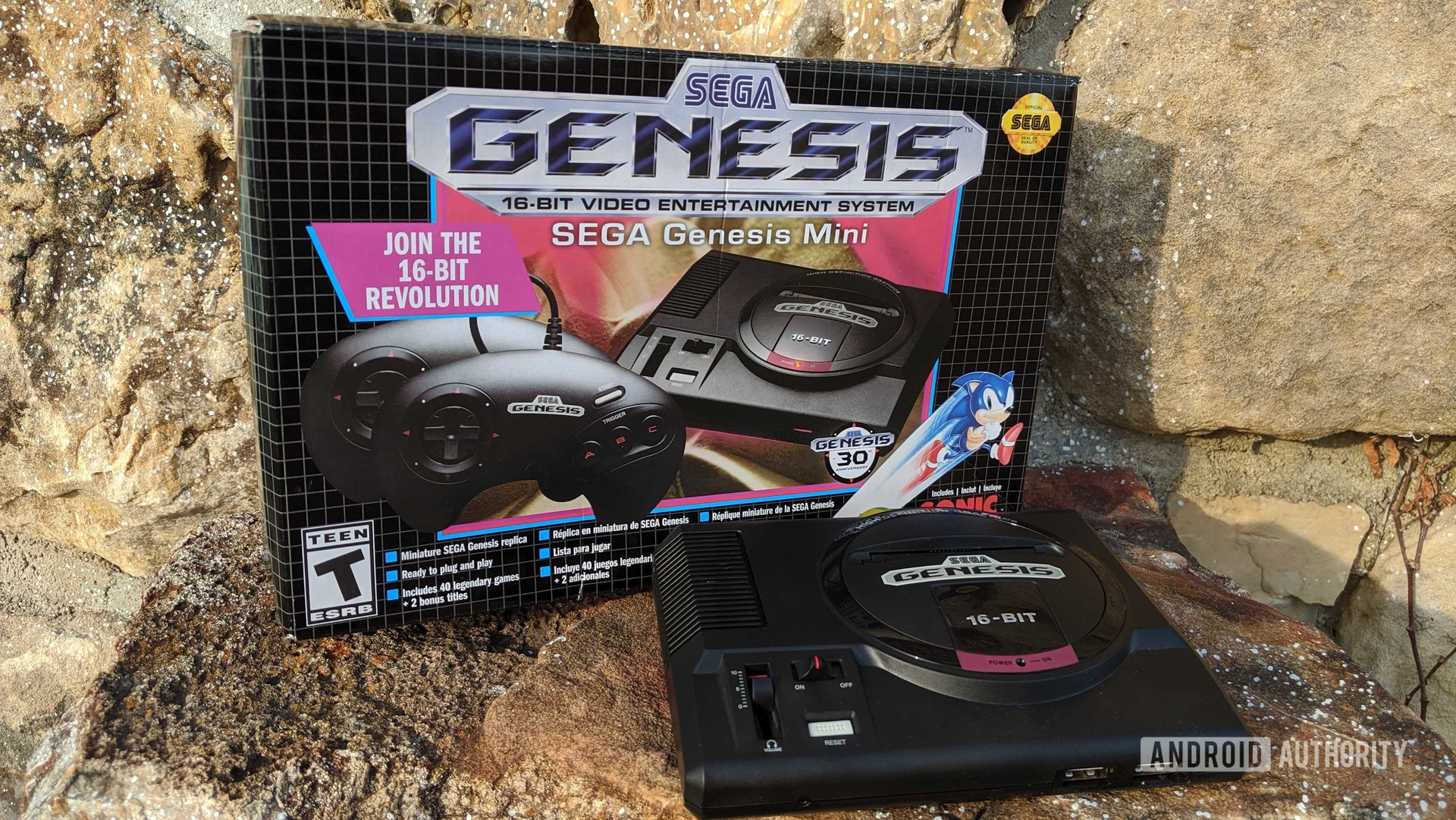
Nevertheless, all of the available games play really well on any TV, even if there is no blast processing involved. Both controllers can be found in the box, but they are the early 3-button versions, instead of the later 6-button controllers. They also use USB ports, which depending on your preferences, can be quite beneficial. The Save Anywhere feature is also present, so veterans can easily play with less experienced players.
Overall, this miniature is among the best game consoles on the market. The Sega Genesis Mini might have a slightly higher retail price than the competition, but with Nintendo mini consoles quickly disappearing off shelves, that won’t be the case for long.
These are our picks for the best gaming consoles you can currently buy! Stay tuned for our next update, when the PlayStation 5 and Xbox Series X are expected to join the competition.
from Android Authority https://ift.tt/2R6RT6f