Sunday, 5 April 2020

Cherry Home products you should have at home

With the citywide quarantine imposing us all to stay at home, concerns about a spike in electricity consumption may arise. While this is unavoidable as we all find ways to enjoy our days at home—mostly with entertainment devices, managing expenses can be free of troubles with the right tools.
Cherry Home products you should have at home
Cherry Home IR Transceiver lets you control your IR-enabled devices through your smartphone

Conserve energy and secure your home with Cherry Home

IR Transceiver, Smart Socket, and Smart Adapter

Got infrared-enabled home appliance? Remotely control your television, air conditioner, fan and more through your Cherry Home App. Just connect your Cherry Home IR transceiver to your home Wi-Fi and start controlling your equipment conveniently through your phone. Need to cool the room before bedtime? A few taps are all you need. Want to conserve energy? Plug your fan into a connected Cherry Home adapter/smart wall socket and easily switch from AC to fan in just seconds.


Plug in your non-smart home appliance to these Cherry Home products and get to switch them on and off through your connected device.
Plugin your non-smart home appliance to these Cherry Home products and get to switch them on and off through your connected device.

What's more, Cherry Home Smart Wall Socket and Smart Adapter are Google Home and Alexa compatible. If you've got a Google Home or Alexa-powered device, you can control your connected devices through voice.

Smart Bulb and Smart Light Switch

Brighten up days at home—literally. Set the mood with the Cherry Home Smart Bulb. Dining room dinner date? It's possible. Able to change from red to green, to blue, you can choose a color to fit whatever the occasion. Ready to turn in? The Smart Bulb has a dim feature that goes from bright 99 percent to sleep apt 1 percent. 
Color the room however you want it with the Cherry Home Smart Bulb

Pair this with the Smart Light Switch, and you wouldn't ever be caught in a situation where you've already found your comfortable spot but have to stand up because you forgot to switch the lights off.

WinDoor Sensor

Feel more secure at home with the WinDoor Sensor. This sensor can be used on windows, cabinets, and doors. What it does is, when installed, it keeps records whenever the door, window, or cabinet has been opened. It also notifies the user whenever a door has been opened, acting as an added layer of security.

Since these Cherry Home devices can be controlled through your mobile device, it is easy to see which are not in use. You can simply turn them off and in return cut energy costs.


from GIZGUIDE | Your Gadget Coach https://ift.tt/39GRr4V

What the heck is Quibi, and why should you care? (Update: Launched!)

quibi logo

Update, April 6, 2020 (1:10 AM ET): The Quibi short video streaming app has now officially launched in the US and Canada. The app is available for both Android and iOS platforms.

The original article below details everything you need to know about the new streaming service, including pricing and content options. Read on to know what the new app is all about and how it stacks up against other popular streaming platforms.


Original article, March 22, 2020 (12 AM ET): Until just a few months ago, the word “Quibi” was used mostly by entertainment business media outlets. Now, we are less than a month away from the launch of the new service. So what is Quibi? Simply put, it’s a streaming service with all original content that hopes to make itself stand out from Netflix, Hulu, Disney Plus and others in a few interesting ways.

The big question: Will this service stand out from the many, many established streaming services? Let’s take a look at everything we know so far about Quibi?

So, what is Quibi?

Quibi is an upcoming streaming service that is aiming to appeal to the growing media audience that just watches TV shows on their smartphones and tablets. It will offer a mix of original scripted and non-scripted series, plus daily shows as well.

What the heck does “Quibi” mean, anyway?

The name of the service is supposed to be a mashup of “Quick Bites”, which may give you a bit of a clue for what the company is offering to its customers.

Who founded the service?

The company was launched by two well-known executives; one comes from the entertainment industry while the other has a history in running tech companies. The founder and Chairman of Quibi is Jeffrey Katzenberg, who helped to turn around Disney’s animation division in the 1980s and 1990s. He later co-founded Dreamworks and headed up its Dreamworks Animation division. The CEO of Quibi is Meg Whitman.  Before her current job, she was the CEO of eBay and later became the CEO of HP.

Under their leadership, the Wall Street Journal says that Quibi has already raised a total of $1.75 billion from outside investors before the official launch.

What platforms will Quibi be available?

quibi screenshots

The service is designed to be a mobile-only experience. That means it will launch just for iOS and Android-based smartphones and tablets. That also means that it won’t be natively available for Roku, Amazon Fire TV or Android TV set-top boxes, or smart TVs. The same applies for game consoles.

What does the mobile-only experience mean for users?

Besides ignoring the smart TV and set-top box devices, the mobile-only experience for Quibi will utilize two major features that make the service different than the others. One is that the “series” that will be streamed will have episodes of 10 minutes or less.  That means original Quibi scripted and unscripted series will have a “season” that overall will be the length of a standard feature film.

The other major feature of the service is that the streaming shows can be viewed in both portrait and landscape modes on smartphones and tablets.  In fact, you can switch between the two viewing modes on the fly while you watch a Quibi show. The creators of those series have re-edited their video so they work in portrait mode along with the more popular landscape mode.

When and where will Quibi launch?

The service will launch on Apri 6, but only in the US and Canada for now. There’s no word on when the service will launch in other countries.

What will the service cost?

Quibi will have two subscription tiers. The first, which will show ads before the start of each video, will cost $4.99 a month. You can do away with ads with the more expensive tier, which will cost $7.99 a month.

Can I get the service for free?

Yes, you can. Quibi is currently offering a way to get three months of the service when it launches for free for a limited time. Also, the company has partnered with T-Mobile to offer free service with a T-Mobile plan. For more information, take a look at our “Quibi for free” article.

What can I watch on Quibi when it begins on April 6?

The service will launch with a total of 50 scripted, unscripted and daily series for the launch day on April 6. They include shows like a new version of the short story Most Dangerous Game with Liam Hemsworth, a comedy about flipping houses and Mexican drug cartels with Will Forte, and revival of the classic MTV series Punk’d. You can also watch a number of daily news series from sources like the BBC, NBC News, ESPN and more.

In the weeks and months to come, you can expect to see reboots of series like Reno 911 and The Fugitive, shows from Steven Spielberg and Guillermo del Toro, and much much more. You can take a look at the shows that will be available on launch day, along with all the upcoming series, at our dedicated Quibi shows page.

Other Quibi features

Quibi shows can be downloaded by subscribers for watching while their smartphone or tablet is offline. It’s currently unknown if the video will have 4K resolution for smartphone displays that support it. It’s also unknown how many concurrent streams can be handled on one account. Hopefully, we will get more info on these tech features soon.

Can this service survive the streaming wars?

On the one hand, Quibi’s decision to just focus on the mobile user, and to only create shows with episodes of 10 minutes or less, would seem to be a step back. After all, lots of people stream content on their big screen televisions and they have no problems with binge-watching TV episodes of 35 minutes, 45 minutes or even longer.

On the other hand, it’s very true that the audience for watching short-form content on their form is growing as well. That’s mainly due to the influence of YouTube over the years. The big question? Will those same people pay for content? As always, it always comes to how good the content will be on Quibi. Some of the shows do sound very promising, but will it be worth $4.99 a month? That remains to be seen.

More posts about Streaming


from Android Authority https://ift.tt/33i5htc

Infinix Note 7 Lite with rectangular camera hump and punch-hole now official

Along with the Infinix Note 7, the company launched a "lite" version of the said handset.
Infinix Note 7 Lite with rectangular camera hump and punch-hole now official
Infinix Note 7 Lite

Infinix Note 7 Lite key specs and highlights

The Infinix Note 7 Lite also features a stylish back, but with a different design. It uses a 3D curved glass-like back design in different gradient colors with a rectangular instead of a circular camera hump.

In front, it also sports a punch-hole screen, but it is using a smaller 6.6-inch IPS panel with HD+ 1600 x 720 resolution, 20:9 screen aspect ratio, and 90.5 percent of screen-to-body ratio.

Inside, it is powered by the 12nm Helio P22 octa-core processor clocked at 2.0GHz. It is paired with the PowerVR GE8320 GPU, 4GB RAM, 128GB expandable storage with microSD, and 5,000mAh battery capacity with 10W charging.

The handset also sports the same 48MP f/1.79 main cam, 2MP 25mm macro camera, 2MP depth camera, and low light video camera, and a quad-LED flash like the vanilla Note 7.

For selfies, it has an 8MP selfie cam. You will also find a side-mounted fingerprint reader and DTS audio support. The phone runs with Android 10 OS with XOS 6.0 UI on top.

There's no word regarding its price and availability yet.


Source: GizmoChina


from GIZGUIDE | Your Gadget Coach https://ift.tt/39RQbwc

Globe and TM users can now loan prepaid load up to PHP 50 without service fees

Since the majority of Filipinos cannot go out to buy prepaid load due to the enhanced community quarantine to prevent the spread of COVID-19, Globe is allowing customers to borrow load or subscribe to promos so they can stay connected during this time of crisis.
Globe and TM users can now loan prepaid load up to PHP 50 without service fees
Part of Globe's #SafeAtHome campaign

Loan up to PHP 50 prepaid load without service fees

Globe said that eligible Globe and TM prepaid customers can load from PHP 5 to PHP 50 in form of load or promo.

Non-qualified users for the load may still avail of emergency services comprising 5MB of data for PHP 5 or 3 texts to Globe/TM and 1 load for PHP 4.

To borrow load, customers may dial *143# on their mobile phone and choose "Loans" for Globe or "Utang" for TM users. Then, check the available load loan, promo load, or emergency SMS (text) or data services.

Customers will still see a service fee in the menu description, but Globe is assuring its users that the fees are waived until April 15, 2020.

The borrowed amount will only be collected once the user top-up.

We are constantly looking for ways to support our customers, especially with the current health situation. We understand that many of our customers may be struggling financially or have no access to load or mobile services because of the ECQ in many areas.  Through Globe’s load and promo loans, we hope we can help our customers especially at this time, said Diane Bautista, VP, Globe Feel Valued Tribe.

What do you guys think?


from GIZGUIDE | Your Gadget Coach https://ift.tt/3aXOJJG

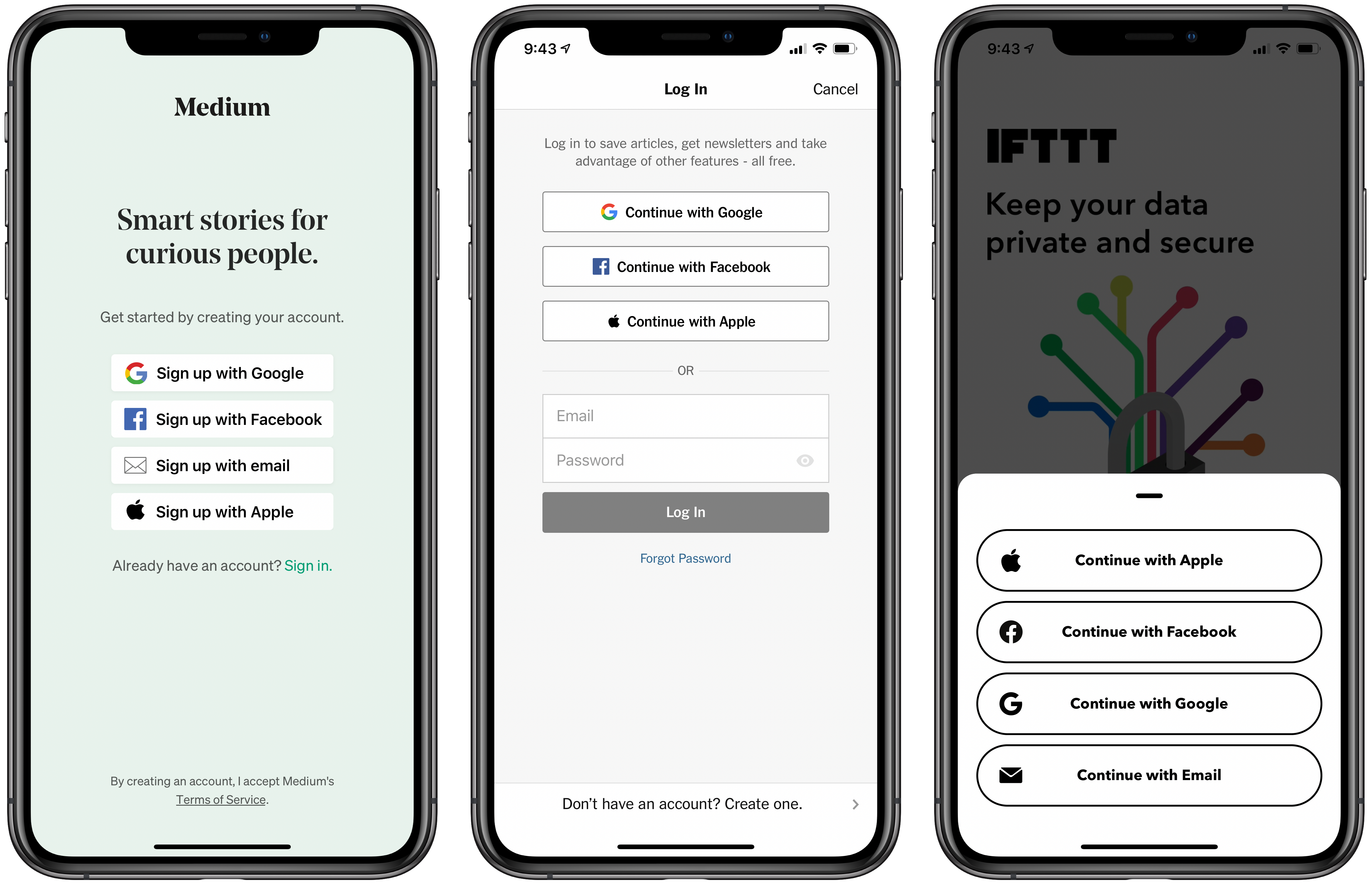
The New York Times, IFTTT, Medium, and Other Apps Adopt Sign in With Apple Ahead of June 30 Deadline

Apps with sign-in functionality, including The New York Times, IFTTT, Medium, and more, have continued to adopt Apple's secure Sign in with Apple feature ahead of a deadline of June 30. The deadline for these apps to support the feature was recently extended from April 30.


‌Sign in with Apple‌, first introduced in iOS 13, allows users to create accounts for apps and websites using an Apple ID. It also lets users to select specific data he or she would like to share with an app and even allows users to mask their email addresses.

The feature has been largely welcomed as a more secure alternative to similar sign-in services since it authenticates the user with Face ID or Touch ID and doesn't send personal information to app and website developers.

MacRumors forum member Pedro Marques has compiled a list of other apps currently supporting ‌Sign in with Apple‌. Be sure to check out our Sign in with Apple guide to learn more about the feature and how it works.


This article, "The New York Times, IFTTT, Medium, and Other Apps Adopt Sign in With Apple Ahead of June 30 Deadline" first appeared on MacRumors.com

Discuss this article in our forums


from MacRumors: Mac News and Rumors - All Stories https://ift.tt/34cOFmZ