Saturday, 8 August 2020

Can Huawei survive without its custom Kirin chips?

Kirin 990 with Huawei logo

A Huawei executive’s recent suggestion that the Huawei Mate 40 series will quite likely be the last of the company’s phones to feature its in-house Kirin silicon was both shocking and inevitable. With US trade sanctions against the Chinese giant now extending as far as foreign chipmakers that use or license and US technology, this prevents TSMC or Samsung from manufacturing chips for Huawei. Without a manufacturing partner, Huawei’s Kirin is no more. Simple as that.

Of course, this would also have a knock-on effect Huawei’s routers, switches, and other bits of hardware that all use Kirin silicon. What happens next is a quagmire of trade rules and weighing up options that may or may not pan out.

Read more: The Huawei and US debacle: The story so far

Huawei could look to China’s own Semiconductor Manufacturing International Corporation (SMIC) to manufacturer Kirin. However, even SMIC uses US-made equipment, so even as a short-term option, it would still stir up trouble with Washington. In addition, SMIC is notably behind on cutting edge lithography technology, sat as it is on 14nm FinFET versus TSMC’s 7nm FinFET and soon to be 5nm EUV processes. SMIC isn’t close to replacing TSMC as a premium-tier manufacturing option.

Without a manufacturing partner, Kirin is no more.

Alternatively, Huawei is still allowed to procure chips from rival designers, providing they aren’t US-based. Qualcomm is obviously out of the question and Samsung doesn’t have a track record of selling large numbers of Exynos chips to outsiders. This leaves MediaTek.

Huawei has already begun using MediaTek chips for some of its more affordable phones. Meanwhile, industry insiders suggest that Huawei purchases from MediaTek will surge by up to 300% this year as a result of the trade ban. Other reports note Huawei has already ordered more than 120 million chips to help cover the Kirin shortfall. Whether Huawei deems MediaTek’s Dimensity 1000 series a suitable premium-tier replacement remains to be seen, but the company may not have much choice if it wants to keep up its sales momentum.

Even with MediaTek as a backup solution, this doesn’t solve the bigger picture problem. By losing Kirin, Huawei’s future phones risk losing almost everything that makes them special.

This is much worse than losing access to the Play Store

Huawei P40 Pro Plus AppGallery macro

Huawei’s Western smartphone hopes were already skewered by the ban on access to Google’s Play Store. The company’s App Gallery alternative, while much improved in recent months, still isn’t a replacement for the ecosystem and apps that smartphone users outside of China are intimately familiar with. As bad as this is, however, the loss of Kirin will be felt outside of the West too.

The first issue is that this latest development impacts all of Huawei’s products, including those sold in China where Google-free phones are the norm. The chip supply issue threatens Huawei’s ability to complete in China, a market the company has become increasingly reliant on as its global appeal stutters. Secondly, and equally devastating, is that without Kirin, Huawei’s smartphones lose their most important unique selling points. Huawei could become just another generic smartphone manufacturer.

Inside the Kirin 990: A tiny 5G, AI, and gaming powerhouse

Huawei’s smartphone reputation is centered on exceptional camera quality. A large part of this is due to the company’s image signal processor (ISP) built into its Kirin chips, which runs the company’s cutting-edge BM3D noise-reduction algorithm and supports its unique RYYB sensor technology. Any future Huawei phones powered by another chip could fall well below the high photography standard everyone expects from the Shenzhen firm.

Almost every single one of each Huawei phone's unique selling points are based on Kirin hardware.

Kirin is also out in front on machine learning thanks to its custom Da Vinci architecture. This lends itself to super-resolution zoom imaging, low-power voice recognition, gesture controls, facial recognition security, and more. This would also halt any integration of the company’s own 5G modem technology and other silicon optimizations.

Huawei can certainly move some of its software and algorithms over to another vendor’s chip. However, there’s no guarantee that they will run as well or as efficiently as they do on the company’s bespoke Kirin processor. The bottom line, Huawei’s phones won’t be the same without Kirin.

Can Huawei survive without Kirin?

Huawei P40 Pro Plus back camera macro

There’s little doubt that without Kirin, Huawei’s ability to adapt and withstand the pressures of the US trade embargo is further diminished. Silicon cuts right to the core of Huawei’s smartphone business and its future now seems to rest firmly on who, if anyone, it can find to work with to get around this latest roadblock.

With no sign of a TSMC replacement on the horizon, Huawei may have to find a new close partner in MediaTek. Outside of a few niche releases, MediaTek’s premium 5G SoCs are a reasonably untested entity and aren’t quite in the same class as rival chips from Qualcomm. Undoubtedly, a switch to MediaTek will have repercussions for the performance, capabilities, and probably costs of Huawei’s premium smartphones, which could further eat into their appeal in the West, but also at home in China.

Silicon cuts right to the core of Huawei's smartphone business.

Having just unseated Samsung for the top spot in the mobile industry, it would take some time for Huawei to lose its position as a major smartphone player. However, adapting to the ever-evolving trade ban inevitably means big changes for the company’s products in 2021 and beyond. We’ll have to see if these products sustain Huawei’s current momentum, but with the potential loss of Kirin, the prognosis looks worse than ever.


from Android Authority https://ift.tt/2DpKyex

5 free resources every data scientist should start using today


Four years ago, I was a recent college grad, starting out my career at a four-person IoT startup. One of my first assignments was to research and propose a solution for an AI-based digital assistant for military settings. Although I studied engineering in college and worked in a lab assisting machine learning research, undertaking a huge natural language processing project without an experienced data scientist/engineer in-house was a daunting task. Inevitably, I had to resort to online resources to fill in the gaps and find mentors outside the organization for direction as well as personal growth. Fast forward to the present, I…

This story continues at The Next Web


from The Next Web https://ift.tt/2CamviR

Amazfit Powerbuds review: Good audio with a fitness twist

True wireless earphones have truly been commodified. With many smartphone manufacturers making their own versions, a product has to stand out in all the right ways to make an impact. Amazfit — the purveyors of some of our favorite fitness wearables — recently launched its own take on true wireless earphones with an interesting fitness-focused twist. The Amazfit Powerbuds join the likes of the Jabra Elite Sport in offering heart rate tracking built into the earphones.

In the Android Authority’s Amazfit Powerbuds review, we find out if a fitness focus is enough to stem strong competition.

Amazfit Powerbuds: How’s the design?

Amazfit Powerbuds Review earbuds showing texture

Amazfit has taken a fashion-forward approach with the design of the Powerbuds. The casing of the earbuds is compact enough and features a unique red overlay atop the matte black plastic. Each earbud weighs about 6g, and while I could always feel the weight in my ear, I never felt bogged down — even after hours of listening.

Amazfit Powerbuds Review in ear fit

Looking in from the outside, the Amazfit fit compactly in the ear, but the heart rate tracking assembly prevented it from resting flush against my outer ear. However, I can’t really complain here as the earbuds never fell off once, even with a spot of running. The sensor for heart rate tracking is located on the right earbud, and it’s designed to be in constant contact with the ear to ensure a consistent reading.

Touch gestures on the Amazfit Powerbuds can be a bit hit or miss, but can be customized extensively.

Both earbuds include touch surfaces for control. I’m not a big fan of gesture-based control on true wireless earphones, and while the Amazfit allows for a lot of flexibility in setting up the controls, my experience was a bit hit or miss. You can configure single, double, or triple taps for controlling playback, enabling pass-through mode, or invoking Google Assistant. In my time with the earphones, there were a few instances where multiple taps weren’t recognized.

Amazfit includes a range of silicone tips in the box. I found the fit to be good enough, but despite trying multiple tips, I could never achieve a tight enough seal and ambient noise was always audible — even with the music turned up loud.

Amazfit Powerbuds Review in ear with ear hook Amazfit Powerbuds Review with case open

Elsewhere, Amazfit has a very nifty trick up its sleeve. The included ear hooks are magnetic and easily latch on to the earbuds. When it comes time to stow them, the hooks slot back into the case to ensure you don’t end up losing them.

The case is on the larger size, but makes up for it with the convenience of offering storage for the ear hooks. It definitely won’t slide into a coin pocket, but is discrete enough in a regular pocket and didn’t cause any unsightly bulges. I wish the lip on the outside of the case had a bit more depth as it was particularly hard to open one-handed.

The built-in magnetic storage for ear hooks is a handy addition to the case.

The buds slot in securely and are held in place by magnets, just like most true wireless earphones. A single LED placed on the outside indicates charging status, as well as when the headset enters pairing mode.

Speaking of which, Amazfit has a somewhat inconvenient approach to this. You must hold down a button on the inside of the case to put the earphones in pairing mode. This can be a bit of a nuisance if you need to jump between devices while still wearing the Powerbuds.

Amazfit Powerbuds Review with case closed

Overall — minor nitpicks aside — there is little to complain about the Amazfit Powerbuds’ design. The build quality lives up to the positioning. The IP55 rating is more than welcome given the fitness focus, and the included easy-to-store earbuds are a nifty addition.

How do the Amazfit Powerbuds sound?

Amazfit Powerbuds Review in hand

For a fitness-focused pair of true wireless earphones, the Amazfit Powerbuds sound remarkably good. Elevated bass is often the norm with workout earbuds, but that really isn’t the case here.

Be it treble highs, vocal mids, or just the deep lows of a bass guitar, the Amazfit Powerbuds sound accurate all the way through. Vocals sound crystal clear, and clarity is retained even with other instruments thrown into the mix. That’s not to say that the earphones are light on bass.

The Amazfit Powerbuds deliver great sound, fitness features, and excellent battery life at an affordable price point. The microphone quality isn’t worth writing home about, but the other features make up for it.

Tracks like The Box by Roddy Ricc will have you bobbing your head, but it’s a measured bass that doesn’t mask vocal frequencies.

As I was listening to Borderline by Tame Impala, the falsetto vocals didn’t sound shrill or overbearing. This is a sure sign that treble notes aren’t emphatically emphasized by the dynamic drivers. Sure, you might not hear all the intricate vocal details, but for the price and primary function as workout earbuds, the Amazfit Powerbuds more than deliver on audio quality.

The Amazfit app lets you dial in the sound exactly how you like it.

Audio can be further tweaked to suit your preferences. The accompanying Amazfit app has a range of presets, as well as a 10-band equalizer to dial in the sound exactly to your preferences. Finally, Bluetooth codec support includes SBC and AAC. Most modern phones should default to AAC, affording you high-quality music listening from streaming sources. Although, Android users may want to force SBC streaming, since AAC performs unreliably across Android devices. The operating system has a hard time with consistent streaming quality via AAC.

All the fitness features

Amazfit Powerbuds Review with heart rate sensor visible

The Amazfit Powerbuds has a unique feature up its sleeve. The sensors on the right earbuds can be used to track your heart rate during activities. This makes a lot of sense if you’re tied into Amazfit’s fitness wearable ecosystem, but not so much if you’re not. Few — if any — third-party apps let you enter heart rate data manually, and you’ll want to be truly invested into the Amazfit ecosystem to reap the benefits.

While running trails remain closed, I took the Amazfit Powerbuds for a quick walk around the block to compare the heart rate measurements against my Fitbit Ionic. The results were reasonably consistent across the devices with a small enough margin of error.

How’s the battery life?

The Samsung Galaxy Buds Plus might set the standard for battery life amongst true wireless earphones, but the Amazfit Powerbuds don’t fare too badly either. Amazfit promises eight hours of use on a single charge. In my testing, I got a little over seven hours of use from the Amazfit Powerbuds with the volume set around the 60% mark.

The Amazfit Powerbuds consistently delivered over 7 hours of battery life.

The battery case gets you two full charges in addition to the eight hours that the earbuds promise. Totaling 24 hours of playback, the battery life should suffice for most users. Fully charging the earbuds takes just north of an hour, and a quick 15-minute charge promises three hours of use which should suffice in a pinch.

Are the Amazfit Powerbuds good for calls?

The Amazfit Powerbuds are fairly hit or miss for cellular calls. While the connectivity was good enough, audio on both ends was a bit muffled and often sounded tinny. The electronic noise cancellation didn’t do a particularly good job at cutting back on ambient noise either. The Amazfit Powerbuds would not be my first choice if making calls is a primary use case.

Should you buy the Amazfit Powerbuds?

Amazfit Powerbuds Review profile shot of earbuds

$99 .00
Amazfit Powerbuds True Wireless Earphones
Buy it Now
Amazfit Powerbuds True Wireless Earphones Buy it Now
$99 .00

Priced at $99 in the US and Rs. 6,999 in India, the Amazfit Powerbuds true wireless earphones sound great and have excellent battery life. The fitness features work as advertised but I wouldn’t necessarily buy the earphones just for that, unless you are already tied into the Amazfit ecosystem of fitness wearables. The IP55 rating is great to have and the magnetized ear hooks are a very well-thought-out addition.

There are other options like the Mi True Wireless Earphones 2 and the Redmi Buds S that deliver decent sound at similar or lower prices, but the feature set here is hard to match, and that makes the Amazfit Powerbuds true wireless earphones a win in my books.

Overall, there’s little to fault here and if you are in the market for a new pair of fitness-focused earphones that also sound great, the Amazfit Powerbuds true wireless earphones get a resounding thumbs up from me.


from Android Authority https://ift.tt/3a7YZ2L

Globe outs new Go promos for Students, starts at PHP 50 (5GB open data + 1GB GoWiFi + 1GB apps)

Globe today revealed a revamped Go promo specifically designed to help students enjoy more data that they can use for homeschooling.
Globe outs new Go promos for Students, starts at PHP 50 (5GB open data + 1GB GoWiFi + 1GB apps)
Globe's Go promos for Students

Big and affordable data promo for students

The new Go promo starts at Go50 for Students. It comes with 5G open data that you can use for any website, app, or service for 3 days and Unli texts to all network and 1GB GoWiFi.

But, it has an extra 1GB that you can use for GoLEARN&WORK apps like YouTube Learning, Wikipedia, Zoom, Viber, and WhatsApp.

The Go70 for Students is almost the same with 5GB open data and all the other freebies from Go50. But, it is valid for 5 days.

If you need more data, you can opt for the Go90 for Students with 8GB open data + Unli texts to all networks + 1GB GoWiFi + 1GB GoLEARN&WORK apps. This is valid for 3 days.

To access the promo, open your GCash app then select "Buy Load" and follow the rest of the on-screen instructions.

Note: The promo is exclusive for Globe Prepaid subscribers and GCash users.

What do you guys think?


from GIZGUIDE | Your Gadget Coach https://ift.tt/3a8K6gv

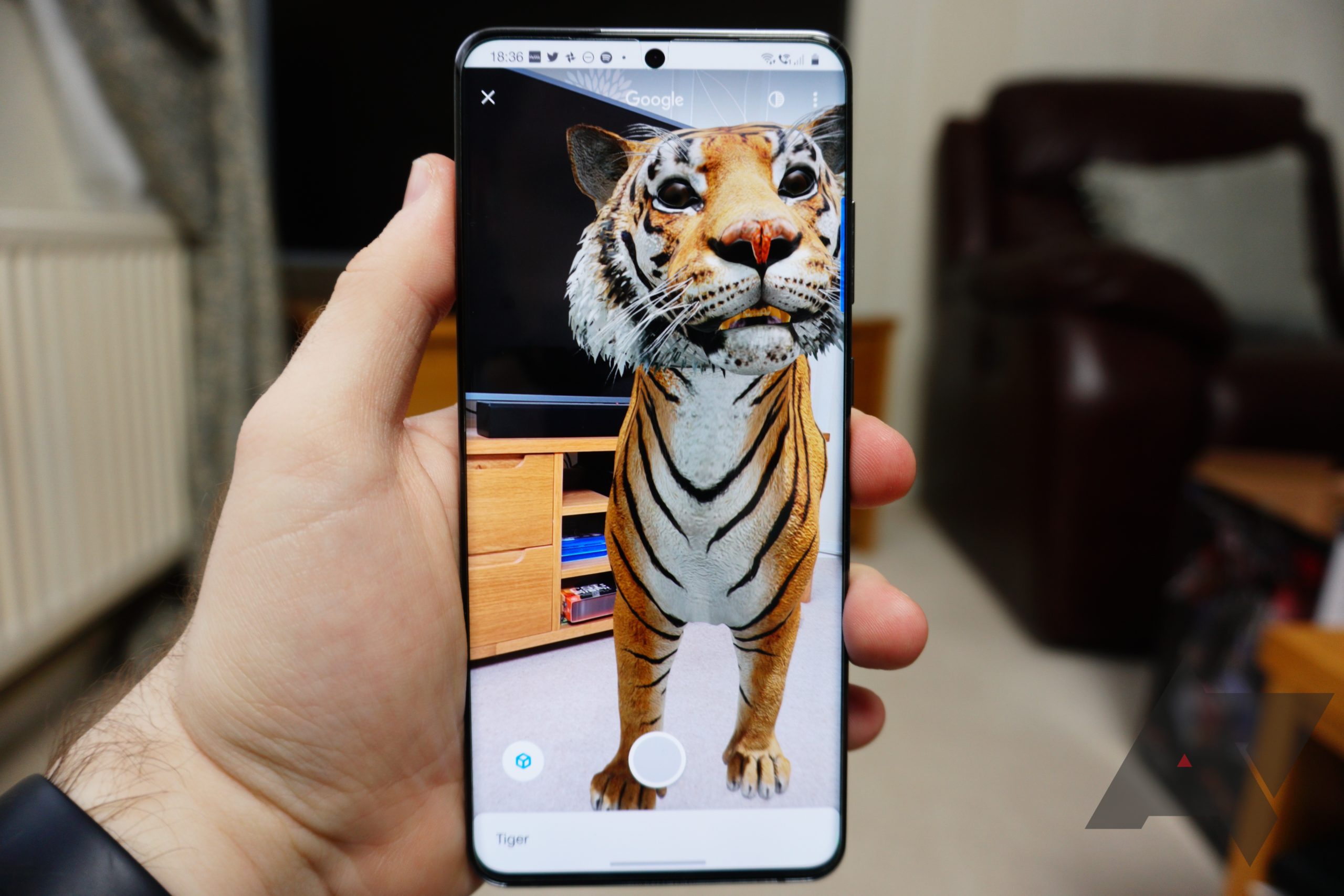
Google's 3D animals: 60+ AR critters, dinosaurs, insects, plus list of compatible phones

Play Tiger King at home with these 3D exotics

Putting a tiger in your living room is generally not advisable. Unless it's a virtual one, that is. Thankfully, Google has enough 3D AR tigers to go around, along with dozens of other exotic and not so exotic critters you can snap photos and videos of from anywhere you currently happen to be standing. In this post, we'll show you how to use them, along with other cool 3D objects, using only the power of Google search and a compatible smartphone.

Read More

Google's 3D animals: 60+ AR critters, dinosaurs, insects, plus list of compatible phones was written by the awesome team at Android Police.


from Android Police – Android news, reviews, apps, games, phones, tablets https://ift.tt/2PyrWLs