Saturday, 10 October 2020

Realme 7 Pro review: One step forward, two steps back

Realme’s rapid cycle of iteration means that you can expect a new mid-range flagship every few months. Unfortunately, Realme’s definition of rapid iteration involves adding a few features, while taking away others. This time around, the Realme 7 Pro adds faster 65W charging but switches up the camera set up. 

How well does the Realme 7 Pro fare as a successor to the Realme 6 Pro, and more importantly, is this the phone to get in the ultra-competitive mid-range segment? Let’s find out in the Android Authority review of the Realme 7 Pro.

Realme 7 Pro
The Realme 7 Pro brings class leading 65W charging to a mid-range price point while delivering on essentials like a decent camera set up, enough performance and a well-optimized but bloatware ridden software experience.
About this review: I wrote this Realme 7 Pro review after spending a week with the phone as my primary device. Realme India supplied the device, which was running Android 10 with Realme UI and the September security patch on board.

Design

  • 160.9 x 74.3 x 8.7mm
  • Polycarbonate construction
  • 182 grams
  • Super AMOLED display
  • Gorilla Glass 3

Realme 7 Pro profile image in hand

Credit: Dhruv Bhutani / Android Authority

The Realme 7 Pro, like the Realme 7, is a small step forward from the Realme 6 series and that’s not a bad thing. The phone trades bling for simple sophistication and does a reasonably good job at it.

Starting off with the back, the Realme 7 Pro has a lot in common with the visual identity of the Realme 7. The split tone finish on the plastic back looks great and feels pretty sturdy too. The matte finish doesn’t attract too many fingerprints, but scuffs can be a bit hard to clean.

Realme 7 Pro side volume rocker Realme 7 Pro power button

Good ergonomics are table stakes, and the Realme 7 Pro does well here. Over on the right, the power button is particularly clicky, while the split volume rocker on the left feels pretty good as well. I did, however, notice just a bit of wobble in the volume keys. Finally, along the bottom edge lies the USB-C port, as well as the headphone jack.

Construction is generally good, but there's a hint of wobble in the volume buttons.

The front of the Realme 7 Pro has seen significant changes compared to the outgoing Realme 6 Pro. To start with, the Full HD+ panel has now been switched out from an 6.6-inch IPS LCD display to a 6.4-inch Super AMOLED panel.

Realme 7 Pro profile image showing display

Credit: Dhruv Bhutani / Android Authority

The panel looks excellent, though the default color tuning is set a bit too cool for my preference. As is usually the case, switching color profiles is a cinch and the Realme 7 Pro’s display exhibits excellent color reproduction with deep blacks and punchy colors. I found brightness levels to be more than adequate for outdoor use.

Realme has made some interesting compromises with the display on the Realme 7 Pro, however. For one, the switch from an IPS to AMOLED panel brings with it the loss of a high refresh rate option. I don’t personally mind it too much, but a 90Hz panel definitely adds to the experience, and this should factor in your purchasing decision. In addition, the phone switches out Gorilla Glass 5 for Gorilla Glass 3.

Realme 7 Pro camera cut out

Credit: Dhruv Bhutani / Android Authority

Finally, the camera cut-out at the top is much smaller this time around, but for an unfortunate reason. You see, Realme has dropped the rather good dual camera front-facing module and, instead, has settled for a single 32MP front-facing camera.

The Realme 7 Pro presents itself as a well put together piece of kit. I found the under-display fingerprint scanner to be particularly capable. Of course, there’s no IPS rating here. Overall though, the phone takes some good steps forward. The reduced weight and overall dimensions go a long way in improving daily usability. The polycarbonate build isn’t as luxurious as some of the other options in this category but it does the trick and feels well built to boot.

Performance

  • Snapdragon 720G
  • Adreno 618
  • 6/8GB RAM
  • 64/128GB storage

Realme 7 Pro camera module

Credit: Dhruv Bhutani / Android Authority

Realme’s mantra of not fixing what isn’t broken rings true with the Realme 7 Pro as well. The phone continues to use the exact same Snapdragon 720G chipset as the Realme 6 Pro. The 8nm octa-core chipset is paired up with an Adreno 618 GPU that keeps the phone running smooth.

Performance more or less remains unchanged here. The Snapdragon 720G handily keeps up with day-to-day use without breaking a sweat. Gaming is satisfactory as well, and the step down from a 90Hz panel to a 60Hz refresh rate should further assist with eking out a few more frames from demanding games.

The nearest competitor for the Realme 7 Pro remains the Poco X3. The Snapdragon 730G toting smartphone is a bit more powerful, but the 120Hz refresh rate negates the advantages of the GPU. The actual difference in performance is smaller than you’d anticipate.

Battery

  • 4,500mAh
  • 65W charging

The biggest step forward with the Realme 7 Pro comes on the battery front, and more importantly with charging speeds. The 4,500mAh cell is a step up from the 4,300mAh battery on the Realme 6 Pro and that phone already delivered excellent battery life. My daily use involves juggling a whole lot of emails, calls, and social media use, and the phone consistently delivered a day and a half of usage.

65W charging is incredible, and the ability to charge your phone in under 40 minutes is a serious value add.

Your mileage will vary, however. Extended gaming will definitely put a dent in battery life, but a full day of use should be easy enough.

Charging speeds get a major upgrade to 65W and that’s the real upsell here. The phone tops off just short of 90% in half an hour, with a full charge taking under forty minutes.

Software

  • Realme UI
  • Android 10

On the software front, things haven’t changed much for better or worse. The Realme 7 Pro runs Realme UI on top of Android 10 and the experience is a bit of a mixed bag.

Realme 7 Pro homescreen Realme 7 Pro bloatware Realme 7 Pro UI ads

The onboard bloatware isn’t ideal, but the forceful browser notifications are particularly irksome. The phone ships with over 20 pre-installed apps, including Realme’s take on a music player that once again has ads in the interface. The entire experience is less than ideal despite the fact that most of the apps can be uninstalled.

On the flipside, Realme has done a stellar job at optimization. The interface is extremely fluid. Swiping and scrolling are a joy. I did not notice a single stutter or lag.

Camera

  • 64MP main, f/1.8, 1/1.73-in. sensor
  • 8MP ultra-wide, f2.3
  • 2MP, f/2.4 depth sensor
  • 2MP, f/2.4 macro sensor
  • Video: 4K @30fps, 1080p @120fps, 720p @960fps
  • Selfie: 32MP, f/2.5
  • Selfie video: 1080p @30fps

With the Realme 7 Pro, the company has once again re-jigged the camera system. In fact, compared to the Realme 6 Pro, the 7 Pro eschews a telephoto lens altogether. Additionally, the secondary ultra-wide camera at the front is no longer included either.

Instead, the Realme 7 Pro makes do with a 64MP primary shooter paired up with an 8MP ultrawide camera, a 2MP macro lens, as well as a 2MP depth sensor. Meanwhile, at the front lies a 32MP shooter.

Realme 7 Pro standard camera

Credit: Dhruv Bhutani / Android Authority

Photographs from the primary shooter are very good, with an excellent amount of detail and true-to-life colors. While there is a hint of oversharpening, Realme hasn’t gone overboard here. Compared to the Realme 7, the company has done a much better job at balancing the color science.

Meanwhile, noise reduction is minimal and I did not observe any untoward smearing on close inspection.

Realme 7 Pro primary camera Realme 7 Pro ultrawide Realme 7 Pro primary camera

Realme 7 Pro ultrawide

The camera tuning between different modes comes close but isn’t exactly the same. Unfortunately, the limits of the 8MP ultra-wide camera resolution are evident here. There’s not much room for cropping in without a noticeable drop in image quality.

Realme 7 Pro 2x zoom

Credit: Dhruv Bhutani / Android Authority

Lacking a telephoto lens altogether, zoom functionality is entirely digital in nature. The 64MP resolution helps, but there are some key takeaways. Images produced largely have a similar color profile, but Realme has upped sharpening a bit too much.

Daylight shots look decent enough, but there is a definite loss of detail once the light starts dropping. Images look just fine on the phone’s display but pixel-peeping reveals aggressive noise reduction and sharpening.

Realme 7 Pro macro close up

Credit: Dhruv Bhutani / Android Authority

The macro camera caught me by surprise. While I don’t particularly care about macro photography, the 2MP camera did a reasonable job of capturing close ups.

Elsewhere, the 32MP selfie camera captures richly detailed images that do a particularly good job at capturing skin tones once you turn off the selfie enhancement features.

You can take a closer look at full resolution Realme 7 Pro image samples here.

Audio

  • 3.5mm audio jack
  • AAC, AptX, Apt HD, LDAC support

Yes, the Realme 7 Pro includes a headphone jack! Audio sounds plenty good even when paired up with high-end headphones. The phone includes stereo speakers, but the audio output isn’t quite stellar. Peak volumes aren’t particularly loud and there’s very little depth to the tinny output.

Meanwhile, Bluetooth audio is just as good as anything else in the segment. There is support for AAC, AptX HD, and LDAC which ensures that no matter your headset, you’ll be able to pipe out high-quality music.

Specifications

  Realme 7 Pro
Display 6.4-inch, FHD+ Super AMOLED
2,400 x 1,080 resolution
60Hz
Chipset Qualcomm Snapdragon 720G
2x Kyro 465 Gold
6x Kyro 465 Silver
GPU Adreno 618
RAM 6/8GB
Storage 128GB
MicroSD Yes
Battery 4,500mAh
USB-C
65W charging
Camera Rear:
64MP f/1.8
8MP f/2.3 ultra-wide
2MP f/2.4 macro
2MP f/2.4 monochrome portrait

Video: 4K at 30fps, 1080p at 120fps

Front:
32MP f/2.5, 85 degree FoV
IP Rating N/A, splash-proof
Headphone port Yes
Connectivity Dual nano-SIM slots
WiFi 802.11 a/b/g/n/ac 2.4/5GHz
Bluetooth 5
Security In-display fingerprint sensor
Software Android 10
Realme UI
Colors Mirror White
Mirror Blue
Dimensions 160.9 x 74.3 x 8.7mm
Weight 182g

Value for money

Starting at Rs. 19,990, the Realme 7 Pro offers a lot of value for users who crave the fastest charging solution. Elsewhere too, the phone is well-built. Bloatware aside, it also has a highly optimized software build that flies.

If peak charging speeds aren’t the biggest priority for you, the company’s own Realme 6 Pro is a fantastic alternative. Priced starting Rs. 18,999, the phone offers a more versatile camera selection, the same power, and a 90Hz IPS LCD display. Of course, 30W charging is no joke either.

The real competitor, however, is the Poco X3. The phone is powered by a Snapdragon 732G, includes a massive 6,000mAh battery and a 120Hz refresh rate. Sure, it might not support 65W charging but with a battery that big, you shouldn’t need to charge the phone all that often anyway. Available starting at Rs. 16,999, the Poco X3 is definitely one to consider.

Verdict

Realme 7 Pro camera module

Credit: Dhruv Bhutani / Android Authority

The Realme 7 Pro is a small step forward with some key improvements. Image quality is solid, and performance is adequate though not quite best-in-class. Additionally, 65W charging support is excellent to have if you often find yourself scrambling to find the charger. However, the switched up camera setup comes across as a downgrade, and while some might appreciate the AMOLED display, the lack of a high-refresh rate option is sorely missed.

However, it isn’t quite the best option in the market. The Poco X3 offers a small performance boost, much of the same feature set, a higher refresh rate display and, at least in India, no ads.

The Realme 7 Pro is a classic example of the company taking a step forward, and two steps backward. While there’s nothing wrong with the hardware, the updated camera setup isn’t much of an upgrade at all.

Rs19999 .00
Realme 7 Pro
Buy it Now
Realme 7 Pro Buy it Now
Rs19999 .00

Overall, the Realme 7 Pro is one of the better smartphone options under Rs. 20,000 in India, but there is better value to be had.


from Android Authority https://ift.tt/3dfwi5r

Zepp E Circle review: All the beauty but missing some brains

There is a high probability that this is the first time you’re hearing of Zepp. That’s because our Zepp E Circle review is centered on the very first Zepp smartwatch.

You might be more familiar with Amazfit/Huami, which bought the Zepp brand earlier this year. Recently, Amazfit converted its smartphone app to the Zepp branding, which means we are likely to see a lot more Zepp smartwatches in the future. For now, it’s probably easiest to think of this watch as an Amazfit/Huami/Xiaomi-adjacent product.

With the Zepp E Circle, Amazfit is gunning for a premium smartwatch experience, and it definitely achieves that when it comes to the hardware. However, health tracking and app support is a different story.

Zepp E Circle review notes: I used the Zepp E Circle for nine days, running firmware v2.6.3.01. I paired the watch with my OnePlus 7 Pro for the duration of this review. Amazfit/Zepp provided Android Authority with the Zepp E Circle review unit. The smartwatch is compatible with both Android and iOS, via the Zepp app available on both platforms. However, we only tested it on Android.
Zepp E Circle A beautiful smartwatch for the buyer who cares mostly about that.
The Zepp E Circle is one of the prettiest smartwatches we've ever used. However, its beauty far outshines its smarts, making it the kind of product we would only recommend to buyers who prioritize looks over everything else.

Design and hardware: It doesn’t get much better than this

Zepp E Circle Review Flat on Wood

Credit: C. Scott Brown / Android Authority

Let me just get this out of the way: the Zepp E Circle is not only one of the nicest smartwatches I’ve worn, but one of the nicest watches I’ve worn in general. It’s thin, light, and elegant, and its rounded infinity edges make it look way more expensive than it really is.

Related: The very best smartwatches you can buy

The 42mm case is only 9.1mm thick, making it much thinner than most competitors out there. For the sake of comparison, the Samsung Galaxy Watch 3 is 13mm thick, the Fossil Gen 5 is 12mm thick, and even the Apple Watch Series 6 is 10.4mm thick.

Zepp E Circle Review Wrist Strap Buckle Zepp E Circle Review Profile Thinness

The model I received for this Zepp E Circle review is the Polar Night Black version with a real leather band. The band is a bit flimsy for my taste so I wasn’t too big a fan of it, but it still felt great on my wrist. Thankfully, the bands are interchangeable with any 20mm bands you can find online.

The bottom line is that if all you care about is the look of your smartwatch, you can’t go wrong here. If you don’t like the rounded look of the Zepp E Circle, you could get the Zepp E Square instead, which has nearly all the same specs and features but in a more Apple Watch-like design.

Zepp E Circle review: Specs

Zepp E Circle Review Back in Hand

Credit: C. Scott Brown / Android Authority

You can find the specs table for the Zepp E Circle below. However, I wanted to highlight a few things.

First off, don’t be swayed by the relatively small battery. Even though a 188mAh cell is much smaller than many competitor watches, the Zepp E sips on that power. I took the watch off its charger on Monday at 8:30 AM, and I didn’t need to charge it again until Sunday morning. That’s six full days of battery life during which I continuously tracked my heart rate, steps, and stress level. I also tracked a few brief bike rides and a six-mile hike that lasted around two hours.

The watch also charges quickly. It takes about 90 minutes to charge from zero to full. However, the charger is a proprietary two-pin magnet. That means you should be careful about tossing the charger in your bag with any sensitive electronics and that it won’t charge on any of your wireless docks or mats.

Finally, there is no NFC chip in this watch and no built-in GPS.

  Zepp E Circle
Display 1.28-inch AMOLED
416 x 416 resolution
326ppi
Case 42.2 x 42.2 x 9.1mm
~32g
Stainless steel construction
Band 20mm
Universal connector
Power 188mAh battery
Proprietary magnetic charger
No wireless charging
Connectivity Bluetooth 5.0 LE
No NFC
No built-in GPS
Sensors Acceleration
Geomagnetic
Ambient light
Tracking Heart rate
Blood-oxygen (SpO2)
Stress
Steps
Sleep
Workouts
Durability 5ATM water resistance

Smartwatch features: Just the basics

Zepp E Circle Review on Wrist Apps

Credit: C. Scott Brown / Android Authority

Since this is the first Zepp smartwatch, it would be unrealistic to expect there to be robust third-party app support. However, it’s worth stating upfront that there is literally no third-party app support on this smartwatch. That means no Spotify, no Google Assistant, no third-party health apps — nothing. It’s possible more app support could be on the way, but this is how it was during my review period.

With that being said, there are plenty of features here that should keep most users happy. There is a simple music controller that worked with every smartphone app I tried. Unfortunately, there’s no accessible internal storage on the Zepp E, so you’ll need to have your phone with you for music.

The Zepp E Circle has all the basic features you would expect, but that's not all it takes to be competitive nowadays.

There’s also a simple weather app, an alarm system, a compass, and a “Find Mobile” app that will ring your smartphone. Granted, these are all basic things you would find on any smartwatch.

The watch also offers a notification system that allows you to check smartphone alerts on your wrist. Unfortunately, there’s no way to respond to text messages from the watch. There’s no speaker or microphone, so voice responses are out. There’s no keyboard system, so typing is also out. Your notifications are read-only.

Zepp E Circle Review on Wrist Weather Zepp E Circle Review On Wrist Workouts

Now, those are all the things that the Zepp E Circle didn’t quite slam out of the park, but it did nail quite a few things. There are a ton of watch faces on offer here (all free during my review period), which is always nice to see. There’s an always-on display option you can use, although that will drain the battery a bit faster than if you don’t. You will also find a customizable hardware button, customizable widgets, and a battery-saving “Basic Watch” mode that Zepp says could double your battery life.

Fitness and health tracking: Lots of options, little accuracy

Zepp E Circle Review Resting Heart Rate

Credit: C. Scott Brown / Android Authority

On paper, the Zepp E Circle is a health-focused buyer’s dream. It offers your standard step tracking, heart rate monitoring, and workout tracking. It also has SpO2, stress, and sleep monitoring.

However, during my time with the Zepp E Circle, I found the health tracking to be hit-and-miss. There were a lot of little issues that kept popping up. For example, I was in the kitchen cooking. I was walking back and forth from the oven to the counter to the sink over and over. In the middle of this, the Zepp E alerted me that I should get up and move around. Was it just not tracking my steps all that time?

Related: The best fitness trackers you can buy right now

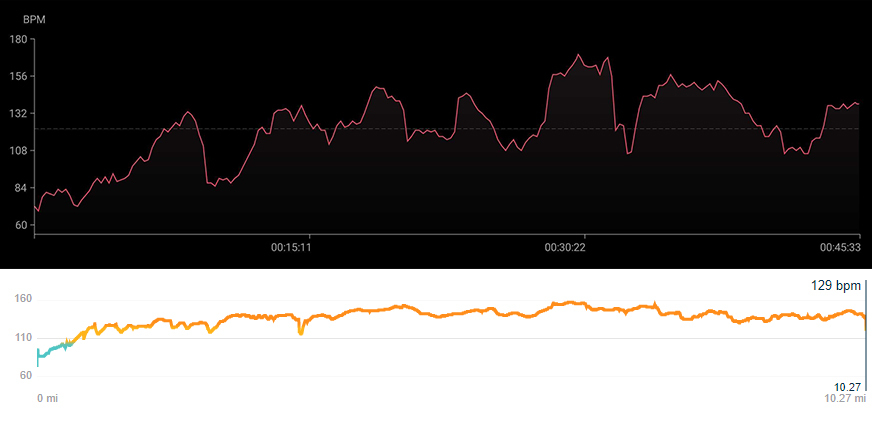
Another example: during a high-intensity bike ride, I wore my Fitbit Charge 4 on one wrist and the Zepp E on the other. During the ride, my Fitbit was alerting me as I moved from zone to zone: Fat Burn, Cardio, etc. The Zepp E, though, stayed in the “Warm Up” zone for the entire ride. Now, it recorded all the info of the ride, but the watch’s real-time display didn’t let me know my heart rate was way up. This would be a huge problem for someone who’s doing high-intensity training and wants accurate heart rate data as they go.

Ultimately, this might be forgivable if the Zepp E data matched the Fitbit Charge 4, but it doesn’t. Check out the charts side-by-side for my heart rate during that bike ride (Zepp is on top, Fitbit is on the bottom):

zepp e review vs fitbit charge 4 heart rate screenshots

Credit: C. Scott Brown / Android Authority

Granted, these graphs are built very differently so it’s hard to compare them like this. However, I can tell you that the Fitbit recorded me at a 135bpm average with a peak of 157bpm. The Zepp E, on the other hand, says my average was 122bpm and the peak was 170bpm. Those are wildly different numbers.

As mentioned in the specs section, the Zepp E doesn’t have a built-in GPS. On that bike ride, I used the connected GPS feature with my OnePlus 7 Pro. I was able to compare this with the internal GPS tracking of the Fitbit Charge 4, and things matched up really well. This suggests that GPS tracking should be fairly accurate, although your phone’s GPS will have a big effect on that.

The bottom line is that the Zepp E offers a whole lot of health tracking, but the accuracy of some of that tracking might not be high.

The Zepp app: A good start

Zepp E Circle Review Zepp App

Credit: C. Scott Brown / Android Authority

Most of the functions of the Zepp E Circle can be tweaked directly on the watch. However, there’s a whole lot going on in the Zepp Android app, and you’ll need to use it to get the watch up and running. It’s pretty much the previous Amazfit app, with a change of branding.

The onboarding process of the Zepp E is clunky, to say the least. I am pretty critical of Google’s Wear OS, but onboarding is one aspect where that operating system really shines. The Zepp app could learn a lot from it.

Zepp's proprietary smartwatch OS reminds me a lot of Wear OS, for better or worse.

As an example, at a certain point during the setup, you need to manually tweak your phone’s settings to ensure that the Zepp app’s activities don’t conflict. The app gives instructions for various phone manufacturers to do this, but OnePlus wasn’t on the list. Unbelievably, neither was Google, LG, or even Apple. This left me scrambling to figure out where the various settings are located.

Additionally, the Zepp app would sometimes stop syncing with the Zepp E. There were three times during this Zepp E Circle review that I needed to force stop the app, clear the cache, and then reboot just to get the watch to sync correctly.

Those are some big complaints, but I will admit that the Zepp app has a lot of good going for it. It’s fast with tons of settings tweaks, charts, and stats. It gives the user a high level of control over what the watch does and how the app integrates with the watch’s data. It also integrates with other platforms, such as Strava and Google Fit.

What Zepp needs most is to trim the fat, make onboarding easier, and localize the app for various markets. As it is now, the app is very clearly just a translated version of a Chinese app, not an app specifically catered to United States buyers. If it can do those things, the Zepp app will be killer.

Zepp E Circle review: Value, competition, and the verdict

Zepp E Circle Review Standing on Wood

Credit: C. Scott Brown / Android Authority

At $250, the Zepp E Circle is no budget watch. For about $45 more, you can get the Fossil Gen 5, which has NFC, built-in GPS, accessible memory for music storage, and much more. And for $20 less, you can get the Fitbit Versa 3, which will likely give you more accurate data tracking while providing most of the same features as the Zepp E.

However, the Zepp E looks a whole lot better than either of those watches. It will also trounce a lot of competitors when it comes to battery life.

Overall, the Zepp E Circle is a good buy. Yes, there are a lot of issues I have with its lack of features and inaccurate health tracking. But hey, those things might not be important to every buyer. Some buyers just want a watch that looks great, feels great, and does the basics. That’s the Zepp E Circle.

$249 .99
Zepp E Circle
Buy it Now
Zepp E Circle Buy it Now
$249 .99

One more thing: if you are an iPhone user, you probably shouldn’t even look at this watch. For $30 more, you can get the brand new Apple Watch SE, which will almost certainly be better in every respect than the Zepp E Circle. Of course, this only applies to iPhone users, as you still can’t use an Apple Watch without an iOS device.


from Android Authority https://ift.tt/34DoTca

Huawei confirms Mate40 October 22 launch date!

This is it! Huawei today confirmed that then Mate40 series will go official on October 22, 2020, via Livestream at 14:00 CEST (8PM Manila Time).
October 22, 2020!

Mate 40 series launch date confirmed!

The Mate series is expected to be the few first Android phones to be powered by the 5nm HiSilicon Kirin AI chips.
The possible design of the Mate40

The company is expected to release four phones in total which include the Mate40, Mate40 Pro, Mate40 Pro+, and PORSCHE DESIGN HUAWEI Mate40 RS.

Earlier rumors shared the phones will come wiht a curved OLED screen with a pill-shaped selfie camera complete with sensors like 3D ToF similar to the P40 Pro. Except for the vanilla Mate40, the rest of the Mate40 series will run with EMUI 11 skin and it might ship with 66W Huawei SuperCharge.

High-end models of the Mate may also come with a liquid lens camera module for faster autofocus and better stabilization.

Recently leaked renders showed that the phone has a circular quad-camera setup with a superzoom periscope lens.

Stay tuned for our full report.


from GIZGUIDE | Your Gadget Coach https://ift.tt/2SJyUyQ

Ace Force: Joint Combat 2.2.0 Jailed Cheats +3

Modded/Hacked App: Ace Force: Joint Combat by OneWorld LLC Bundle ID: com.oneworld.ef5.x iTunes Store Link: https://ift.tt/36QJ3Co Hack Features: - Inf Energy - All Planes Unlocked (Complete a Level)- All Planes Owned (Complete a Level) Jailbreak required hack(s): https://ift.tt/32rfmBY Modded Android APK(s): https://ift.tt/36BCz7P For more fun, check out the Club(s): https://ift.tt/2NSn17b iOS Hack Download Link: [Hidden Content] PC Installation Instructions: STEP 1: If necessary, uninstall the app if you have it installed on your iDevice. Some hacked IPAs will install as a duplicate app. Make sure to back it up so you don't lose your progress. STEP 2: Download the pre-hacked .IPA file from the link above to your computer. STEP 3: Download Sideloadly and install it. STEP 4: Open/Run Sideloadly on your computer then connect your iOS Device and wait until your device name shows up. STEP 5: Once your iDevice appears, drag the modded .IPA file you downloaded and drop it inside the Sideloadly application. STEP 6: You will now have to enter your iTunes/Apple ID email login & then your password. Go ahead and enter the required information. STEP 7: Wait for Sideloadly to finish sideloading/installing the hacked IPA. STEP 8: Once the installation is complete and you see the app on your Home Screen, you will now need to go to Settings -> General -> Profiles & Device Management. Once there, tap on the email you entered from step 6, and then tap on 'Trust email@iosgods.com'. STEP 9: Now go to your Home Screen and open the newly installed app and everything should work fine. You may need to follow further per app instructions inside the hack's popup in-game. NOTE: For free Apple Developer accounts you will need to repeat this process every 7 days. Using a disposable Apple ID for this process is suggested but not required. Jailbroken iDevices can also use Sideloadly to install the IPA with AppSync. Filza & IPA Installer (or alternatives) from Cydia also work. If you have any questions or problems, read our Sideloadly FAQ section of the topic and if you don't find a solution, post your issue down below and we'll do our best to help! If the hack does work for you, post your feedback below and help out other fellow members that are encountering issues. Credits: - K_K Cheat Video/Screenshots: N/A

from iOSGods RSS Feed https://ift.tt/2Ijl2cZ

Ace Force: Joint Combat Hack

Hack Features: - Inf Energy  - All Planes Unlocked (Complete a Level) - All Planes Owned (Complete a Level) App Installation Instructions: 1. If necessary, uninstall the App Store version of the app if you have it installed on your iDevice. Make sure to back it up so you don't lose your progress. Alternatively, you can use the 'Custom Install' option to install the new app as a duplicate without having to overwrite or uninstall the original. 2. Once the installation is complete and you see the app on your Home Screen, you will now need to go to Settings -> General -> Profiles & Device Management. Once there, you will need to trust the new certificate that is related to the app you just installed. Then simply open the (hacked) app. If you require more information or help, please read our Frequently Asked Questions topic on iOSGods.com. Download this app from the iOSGods App. No Computer, No Cydia & No Jailbreak Required! The best app for Tweaked & Hacked iOS/iPhone/iPad Apps & Games!

from iOSGods RSS Feed https://ift.tt/36MwAQ5